We all use the chat box like a draft. We type, we change our mind, we delete, and we think nothing goes anywhere until we press Enter.
Some days ago I was teaching my intern about SSE (Server-Sent Events). We talked about the different ways a server can push data to the client, like SSE, WebSockets and RPC streaming, and I said that Claude Code and some AI chat tools use SSE to stream the answer. So I opened ChatGPT with DevTools to show it. And yes, the answer came back as text/event-stream. But before I even sent my message, I saw some requests to an endpoint called prepare. I didn’t send anything yet! So I wanted to know what is really going on. I recorded a full session, every key I pressed and every request, and checked what goes out and when.
Short answer: the first letter you type is sent to OpenAI about 20 milliseconds after you type it. After that, the text in the box is sent again every 45 seconds while you are editing. Each of these requests reserves a specific server for you for 60 seconds, and when you finally send your message, it takes the token for that server with it.
How I tested it
DevTools shows the requests, but it doesn’t show which key caused which request. So before typing, I pasted a small script in the Console on chatgpt.com. It wraps window.fetch and saves the body, headers and response of every conversation request. It also saves every change in the message box with a timestamp. Before saving anything, it removes the authorization header, cookies, device IDs and anti-bot tokens.
To be sure the script didn’t miss anything, I also checked the browser’s Resource Timing list. It showed 15 matching requests, and my script had all 15.
My setup: Chrome 156 on macOS, a normal chat (not a temporary chat), model on Auto, 26 October 2026. Then I did this:
- I typed
Helloletter by letter, waited, and deleted it. - I typed
My fake secret is 12345, waited about 15 seconds, and deleted it. - I left the box empty for more than one minute.
- I typed
سلام(“hello” in Persian) and pressed Enter.
What went out
4 requests went out before I pressed Enter, and one more right after it:
| Request | What was sent |
|---|---|
| #1 at 19.6 s my first key, +20 ms | "H" |
| #2 at 64.6 s 45.000 s after #1 | "My fake secret is 12345" |
| #3 at 111.3 s 45.0 s after my next edit | nothing, the box was empty |
| #4 at 195.3 s first key, +19 ms | "س" |
| Enter at 204.8 s the real message | سلام to /f/conversation |
| #5 at 207.7 s 2.9 s after Enter | nothing |
This is the same session in the Network tab (filter: “prep”):
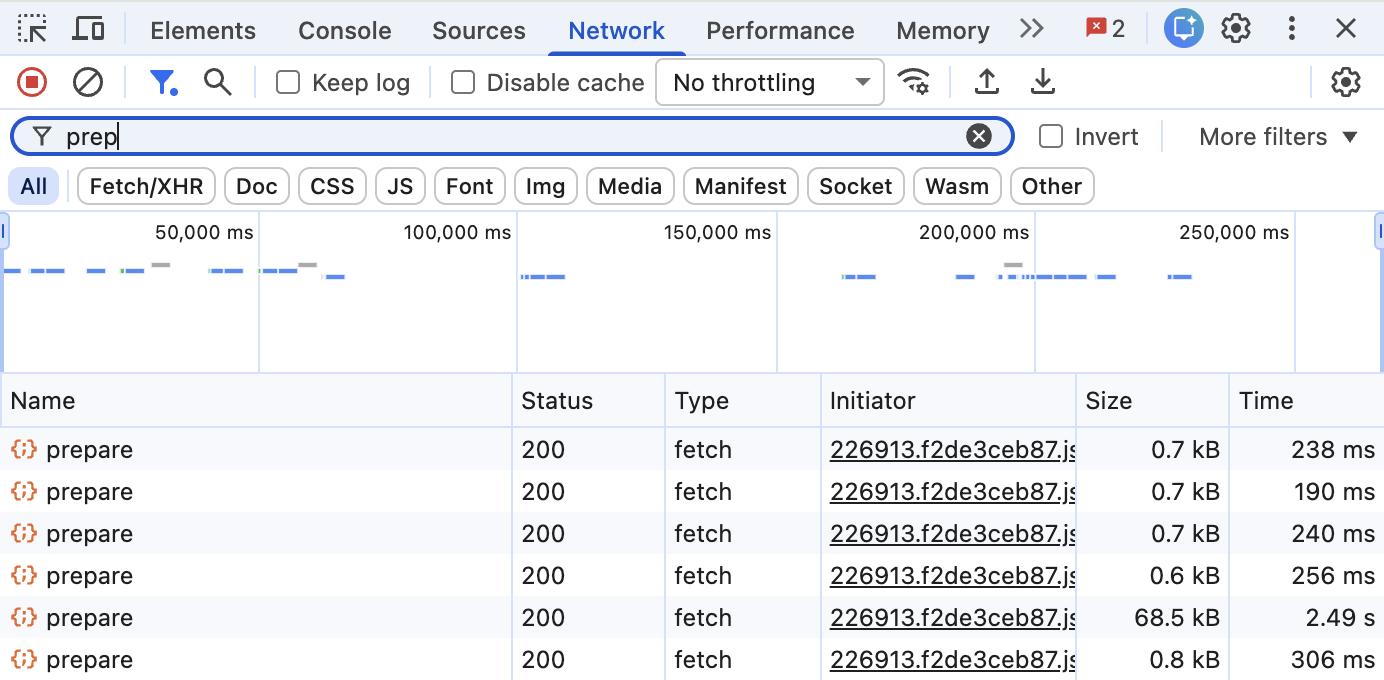
/sentinel/chat-requirements/prepare), and the last row is request #5.The first letter goes out right away
Request #1 had only one letter: H. It was sent 20 milliseconds after I pressed the key. Later the same thing happened with س, after 19 milliseconds. So ChatGPT doesn’t wait for you to stop typing. If nothing was sent recently, your first letter goes out immediately.
After that, every 45 seconds
Requests #1 to #4 have this field: client_prepare_dispatch: "debounced". Usually “debounced” means “wait until the user stops typing”. But the timing shows something else. When I typed and deleted Hello and then typed the fake secret, I made 33 edits in 28 seconds, and sometimes I stopped for up to 16 seconds. Nothing was sent. Then request #2 was sent exactly 45.000 seconds after request #1, and 16.6 seconds after I stopped typing. It had whatever was in the box at that moment.
I wanted to be sure this was not random. So I wrote a small simulation: I gave my recorded edits to three different timing rules and compared the results with the real requests:
real prepare requests before Enter:  19588  64588  111279  195305 ms
throttle, 45 s:                      19602  64602  111262  195319 ms   4 of 4, max 17 ms off
debounce, 1 s pause:                 6 requests at wrong times
debounce, 500 ms pause:              11 requests at wrong times
The 45 second throttle matches all four requests, with max 17 ms difference. (This small difference is because my script used the browser input events as the clock.) The rule is simple: send on the first change, then send at most once every 45 seconds with the latest text. This is exactly how throttle works in lodash. And lodash builds throttle from debounce with a maxWait option, so maybe this is why the field says “debounced”.
What did the server get?
For privacy, this is the most important part. And it’s not as simple as “everything you type is sent”:
Hello: I typed it and deleted it between two requests. Only the first letter,H, left my browser.My fake secret is 12345: it was still in the box when the 45 second timer fired, so the full text was sent. I started deleting it 1.7 seconds later. Too late!- When the box was empty, the next request didn’t have
partial_queryat all. So the server also knew that the draft was deleted.
So if your deleted text reaches OpenAI or not, depends on timing. The first letter always goes. And anything that is still in the box when the timer fires also goes.
Also, these requests are not anonymous. Every prepare request has the same authorization header and chatgpt-account-id as a normal message. And all four requests before Enter had the same x-oai-turn-trace-id as the message I finally sent. So on the server side, these drafts can be connected to my account and to my real message. What OpenAI does with them (do they log them? for how long? do they treat them like sent messages?) I can’t see from outside.
What is inside a prepare request
This is the body of request #2. I made the message ID shorter:
{
  "client_prepare_state": "sent",
  "action": "next",
  "model": "auto",
  "parent_message_id": "client-created-root",
  "timezone": "Europe/Istanbul",
  "timezone_offset_min": -180,
  "is_do_not_remember": false,
  "local_function_names": [
    "local.continue_in_work"
  ],
  "partial_query": {
    "author": {
      "role": "user"
    },
    "content": {
      "content_type": "text",
      "parts": [
        "My fake secret is 12345"
      ]
    },
    "id": "b60b…b80e"
  },
  "client_prepare_dispatch": "debounced",
  "client_prepare_source": "composer_editor_state"
}
It looks like a real message request: action, model, parent message, timezone. The only difference is that the draft is in partial_query, not in messages. And client_prepare_source: "composer_editor_state" means the request came from the state of the text box, not from a button.
A server reserved for 60 seconds
Request #1 had no token. But its response had one:
{"status": "ok", "conduit_token": "eyJhbGciOiJFUzI1NiIsInR5cCI6IkpXVCJ9.eyJjb25kdWl0X3V1aWQiOi…"}After that, every prepare request sent the latest token back in an x-conduit-token header, and every response gave a new one. The token is a JWT. The payload of a JWT is only Base64url encoded. It’s signed (ES256) but not encrypted, so anyone who has it can read it. You can decode it in the Console. Please don’t paste it into a random JWT website:
const token = '…'; // the conduit_token value
JSON.parse(atob(token.split('.')[1].replace(/-/g, '+').replace(/_/g, '/')))
This is the first token. I hid the IDs:
{
  "conduit_uuid": "455d…b5af",
  "conduit_location": "10.x.x.x:8307",
  "cluster": "unified-189",
  "iat": 1793010064,
  "exp": 1793010124,
  "turn_topic_id": null
}conduit_locationis a private IP address and port. It’s one specific machine inside OpenAI’s network.clusteris the name of the group of machines.expminusiatis 60. So the token is valid for 60 seconds. All tokens in my session had the same 60 seconds.
When I followed the token during the session, I saw how the reservation stays alive:
- Request #2 sent the first token back while it was still valid. It got a new token with the same conduit ID, valid for another 60 seconds. Request #3 did the same.
- Request #4 came 84 seconds after #3, so its token was already expired (24 seconds before). The server gave a new conduit ID, but on the same machine and in the same cluster.
- My real message (to
/f/conversation) had this new token andclient_prepare_state: "success". Its response renewed the token one more time.
Here is the same session, but this time with the tokens. Press Play to see it again:
45 seconds is less than 60 seconds, so while you keep typing, the reservation never expires. I don’t think this is random, but I can’t prove it from outside.
It also gets ready for your next message
Request #5 was sent 2.9 seconds after I pressed Enter. The answer was still coming! It had client_prepare_dispatch: "immediate" and client_prepare_source: "context_change", the new conversation ID, and no draft. It got a reservation on another machine in the same cluster. So before I even read the answer, a machine was already waiting for my next message.
Why do they do this?
OpenAI didn’t write anything about this endpoint, so this part is my guess.
I think the reason is speed. Before you see the first word of the answer, a lot of work must happen. Your request must go to a machine that has free capacity. Then the context must be ready: the system prompt, your custom instructions, memory, tools. Most of this doesn’t depend on what you are going to write. So if they reserve a machine on your first key and keep it alive while you type, they can do this work before you press Enter. And the conduit token is probably how your final message finds the same machine.
Does the server also start to process the partial text? I don’t know. But the draft is there, so it’s possible.
There are also some hints that the server may decide other things early. Every prepare request had oai-genui-client-actions: launch_ecosystem_widget,trigger_agentic_handoff, and the body had local.continue_in_work. These look like a list of things the client can do. So maybe the server decides early if a widget or a hand-off to another mode is needed. But this is only a guess from the names.
Is this bad?
Speed is good. Nobody likes to wait for an empty answer. But most people think the chat box is private until they press Enter, and here this is not completely true. Your first letter always goes to OpenAI. And the text that is in the box when the 45 second timer fires also goes, connected to your account, even if you delete it one second later.
To be fair, ChatGPT is not the only one. Search engines send your keys for autocomplete, and email apps do the same for smart compose. It’s a normal way to make apps feel fast.
The difference is what we expect. With a search box, we kind of know the suggestions come from a server. With a chat box, most people think nothing happens before Send. I think people should know how their tools really work.
And for me, honestly, it’s not fine. When I press Enter, I decide what I share. Here a 45 second timer decides for me. My fake secret was sent only because it was in the box at the wrong moment. In real life it can be a password that I pasted in the wrong window, a name that I decided not to share, or a message that I wrote when I was angry and then deleted. These drafts go with my account ID and with the same trace ID as my real message, and I can’t see if OpenAI keeps them or for how long.
Also, the reservation doesn’t even need my text. Request #3 had no draft at all, and it still kept the reservation alive. So the text is sent for something else, and I don’t know what. I want my draft to stay in my browser until I press Enter.
Something strange in the headers
I used a normal Chrome tab. But every request had originator: Codex Browser, x-openai-web-frontend: codex_webview and x-openai-codex-window-type: browser, and the message body had "app_surface": "codex_browser". Maybe the ChatGPT website now uses the same frontend as Codex (OpenAI’s coding product), or maybe my account is in an experiment. I don’t know which one.
What I didn’t test
- This is one session, one account, one browser, on 26 October 2026. The 45 seconds, the 60 seconds, or the whole endpoint can change, or be different for other accounts.
- I tested a normal chat with the Auto model. I didn’t test a temporary chat or other models yet.
- I can only see what my browser sends. I can’t see what the server keeps.
Try it yourself
Don’t trust me, check it yourself:
- Open chatgpt.com in Chrome and start a new chat.
- Open DevTools (F12 or Cmd+Option+I) and go to the Network tab.
- Write
conversation/preparein the filter box. If you write onlyprepare, you will also see an unrelated sentinel request. - Type one letter. A request should appear almost immediately.
- Type more, then wait and don’t send. The next request should come about 45 seconds after the first one.
- Click on a request. In the Payload tab you can see
partial_query, and in the Response tab you can see theconduit_token.
Final words
I only wanted to show SSE to my intern, and I found this. At first it was just some strange requests in DevTools. But actually it’s a smart system. ChatGPT reserves a machine on your first key, keeps it alive with a new request every 45 seconds while you edit, sends your message with that machine’s token when you press Enter, and reserves the next one before the answer is finished.
I understand why they built it. But for me, speed is not a good reason to send my drafts. In modern web apps, “not sent” doesn’t always mean “not seen”. If you are going to type something you are not sure about, remember that the text box may already be sending it.
— Abolfazl Abbasi
Join the conversation
Questions, corrections, and a different way of looking at it are welcome.